Call Timer Talk Duration Alert — Real-Time Call Duration Notifications for Android
A simple Android call timer that alerts you with vibration and a beep sound as your call passes the time marks you choose — perfect for staying within your carrier's free-call minutes.
Get on Google PlayWho It's For
- Your mobile carrier plan only includes a limited number of free call minutes
- You're on a 5-minute or 10-minute unlimited calling plan and don't want to go over
- You tend to talk longer than you realize and want to keep track of call length
- You want to cut down on call charges
- You need to manage call time efficiently for work calls
Key Features
Vibration + Beep Alerts During Calls
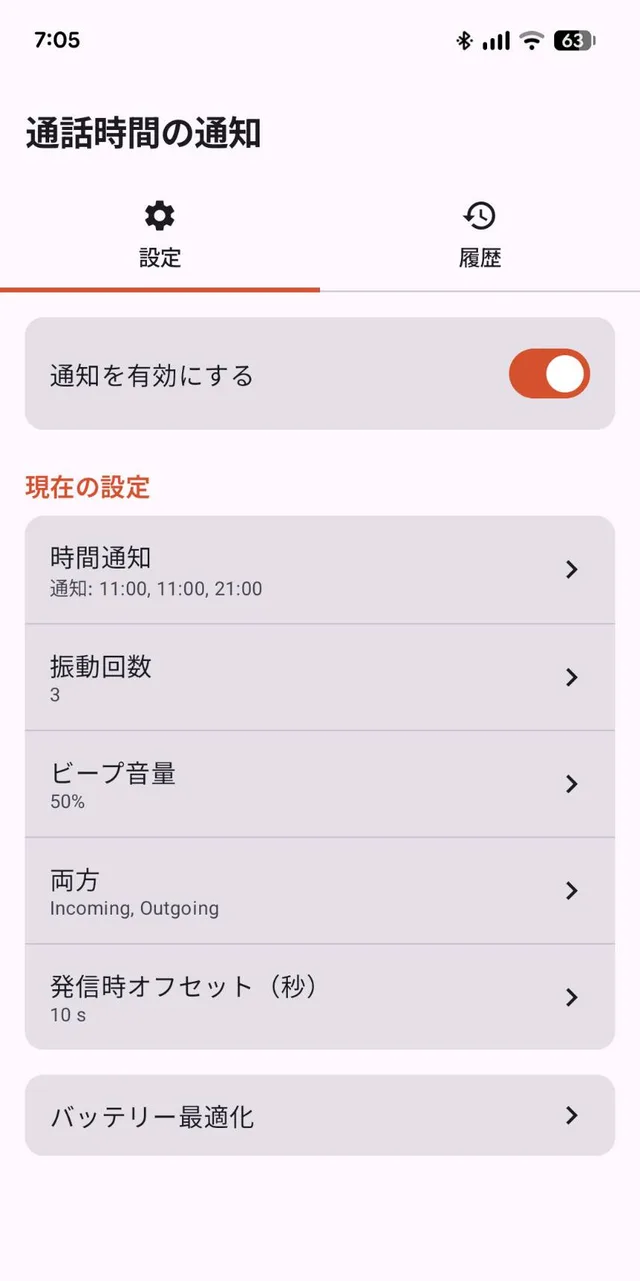
The app watches your live call and alerts you at the moments you choose, combining a vibration pulse with a beep sound so you notice it even with the phone away from your ear. You can adjust the vibration strength (1–3 pulses) and beep volume from the settings screen, and it vibrates once more when the call ends.
Up to Three Custom Notification Times, Set Separately for Outgoing and Incoming Calls
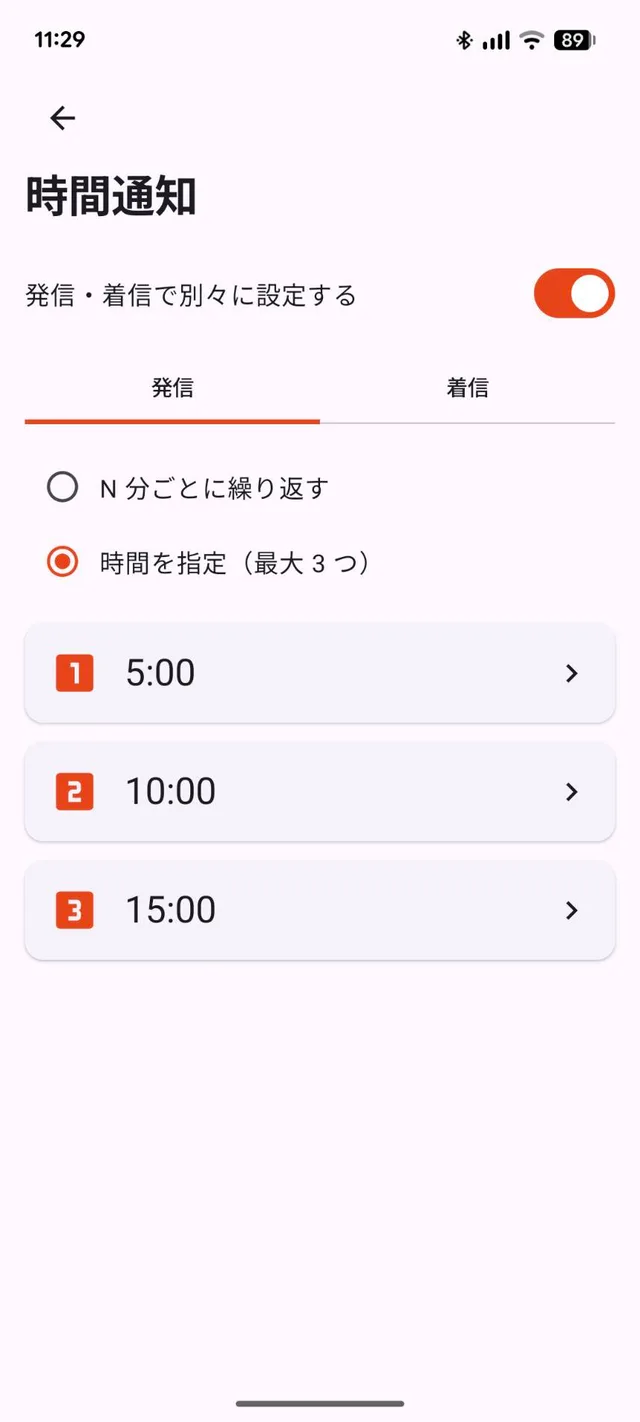
Choose up to three notification times per call — for example 5, 10, and 15 minutes — so you get a heads-up as you approach each milestone. Outgoing and incoming calls can be configured independently, and you can switch to repeating notifications every fixed number of minutes instead.
Notification Times You Can Fine-Tune to the Minute
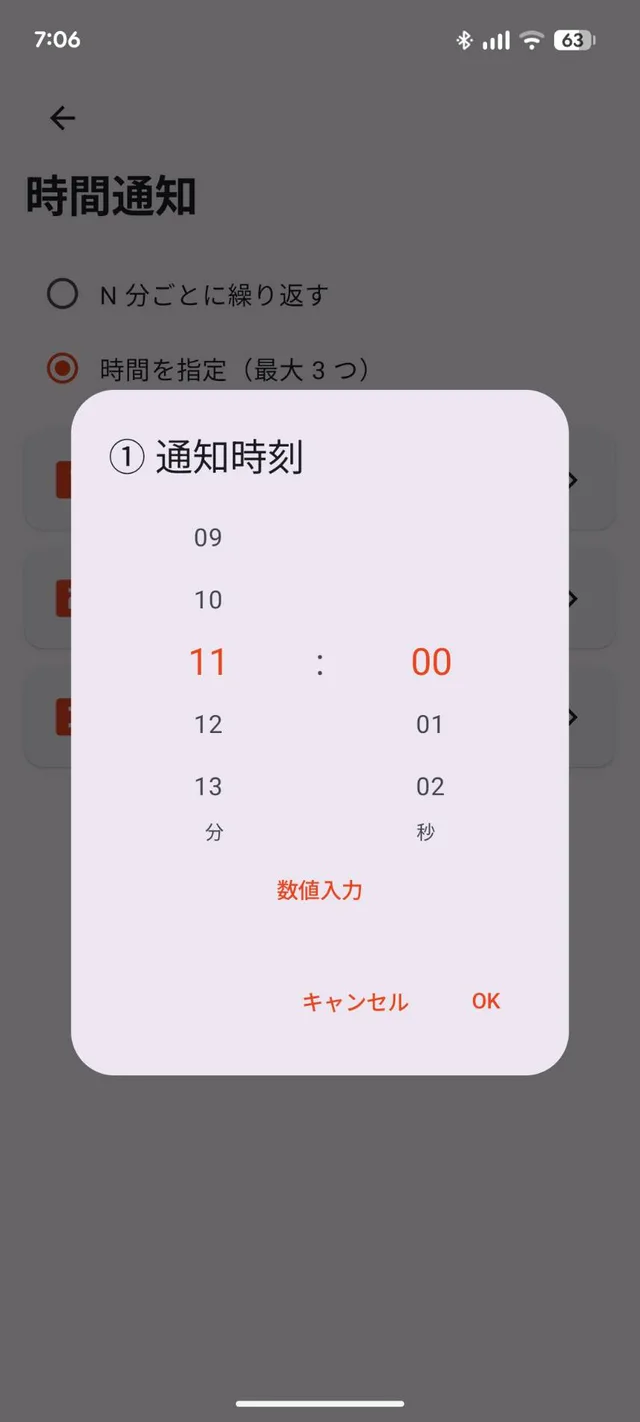
Tap any of the three time slots to open a scroll picker and dial in the exact minute you want to be alerted, giving you full control over when each notification fires.
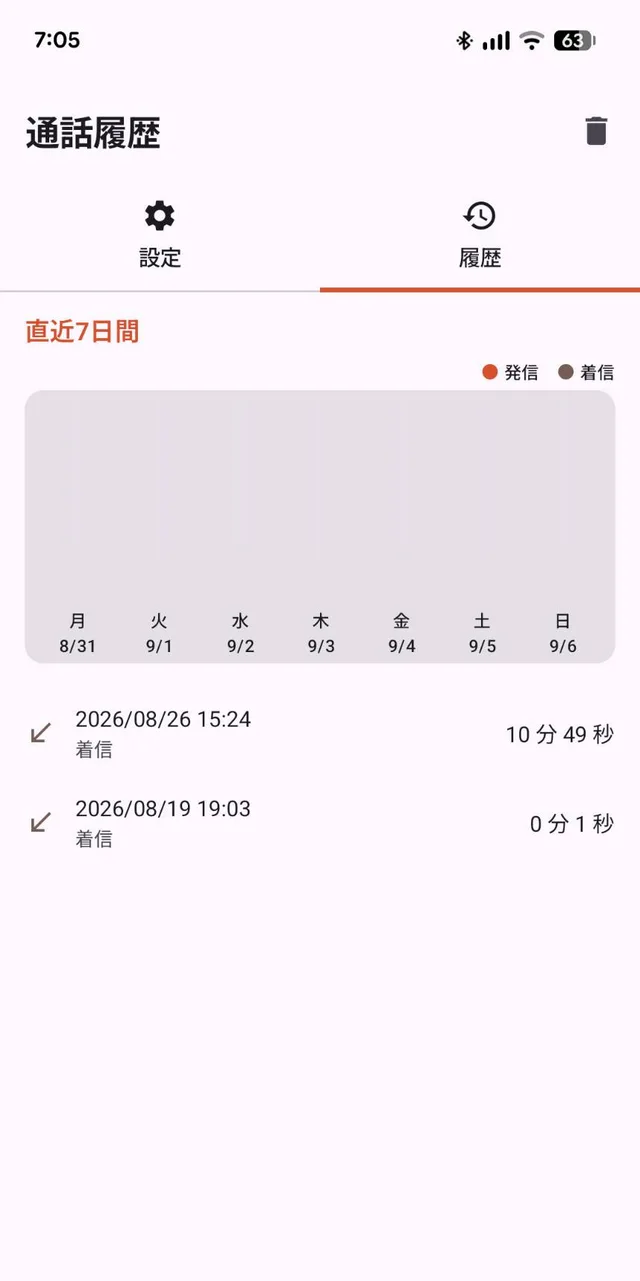
Call History to Review Past Call Durations
Every call is logged with its date, direction, and duration, plus a 7-day chart that separates outgoing and incoming calls at a glance — handy for spotting a pattern of long calls.
Also included:
- Turn notifications on or off separately for outgoing and incoming calls
- Adjust the outgoing call ring offset (in seconds) for accurate talk-time measurement from when the other person picks up
How to Use
- Install "Call Timer Talk Duration Alert" from Google Play.
- Open the app and grant the Phone permission, which is required to detect call state. Grant the Contacts permission too if you'd like the app to identify who you're talking to (optional).
- On the Settings tab, turn on "Enable notifications."
- Under notification times, set up to three notification times for outgoing and incoming calls (e.g., 5, 10, and 15 minutes), or choose to repeat a notification every fixed number of minutes instead.
- Adjust the vibration count, beep volume, and outgoing call ring offset to your liking.
- Make or receive calls as usual — the app vibrates and beeps at the times you set, and you can review past call durations anytime in the History tab.
Frequently Asked Questions
How often can I set notifications during a call?
You can set up to three custom times per call — for example 5, 10, and 15 minutes. If you'd rather be reminded on a fixed cadence, you can switch to repeating notifications every set number of minutes instead.
Does the app notify me with sound, vibration, or both?
Both. It notifies you with vibration and a beep sound. You can adjust the vibration count (1–3 pulses) and beep volume from the settings screen, and it vibrates once more when the call ends.
Can the other person on the call hear the notification?
No. On a regular phone call, the app's beep and vibration play locally on your own device and are not part of the call audio, so the other person will not hear them.
Does the app record or transmit my call content?
No. The app does not record or log call audio, and it doesn't send your call history or contact information to any external server.
Does the app show ads?
Yes. The app is free to use and shows ads. There are no in-app purchases.
Does it work with LINE, WhatsApp, or other internet calling apps?
No. The app works with regular phone calls made and received through your mobile carrier. Calls in internet (VoIP) calling apps such as LINE, WhatsApp, Skype, or Zoom are not detected, so the app does not alert you during those calls.
Which Android versions are supported?
Android 7.0 or later. Google Play also checks compatibility with your device on the install screen.
Permissions & Privacy
- Phone: required to detect call state (start and end of a call).
- Contacts (optional): used to identify who you're talking to. You can review or change permissions anytime under your device's app permissions settings.
The app does not record or log call content, and it does not transmit your call history or contact information externally. To keep the app free, it shows ads; according to its Google Play Data Safety section, device or other IDs may be shared with third parties for ad delivery, while no call content or contact data is collected.
See the full Privacy Policy for details.
Specifications
| Supported OS | Android 7.0 or later |
|---|---|
| Languages | English, Japanese, Korean, Simplified Chinese |
| Price | Free (contains ads, no in-app purchases) |
Try Call Timer Talk Duration Alert
Stop long calls and unlimited-plan overages from sneaking up on you — with a vibration and a beep.
Get on Google Play 𝕏 Share